
CHILDCARE SOFTWARE COMPARISON
CareDay vs. Brightwheel: Turn Future Openings Into Enrolled Care
Looking for a Brightwheel alternative as your childcare organization grows? CareDay connects each child’s full program schedule to future openings, extra-day bookings, and billing. Compare the workflows that help your team turn available capacity into enrolled care.
For childcare owners and operations leaders evaluating their next stage of growth.
Schedule the full journey
Current enrollment and future transitions through your program.
See the opening
Capacity by classroom, date, and attendance pattern.
Fill the right days
Future enrollment and eligible extra-day bookings.
Connect the billing
Charges tied to the scheduled care.
One connected workflow to explore in your demo.
Your next system should fit the decisions you need to make
CareDay is worth a closer look when your team needs to coordinate enrollment plans, classroom capacity, and the financial impact of schedule changes.
Plan beyond the next opening
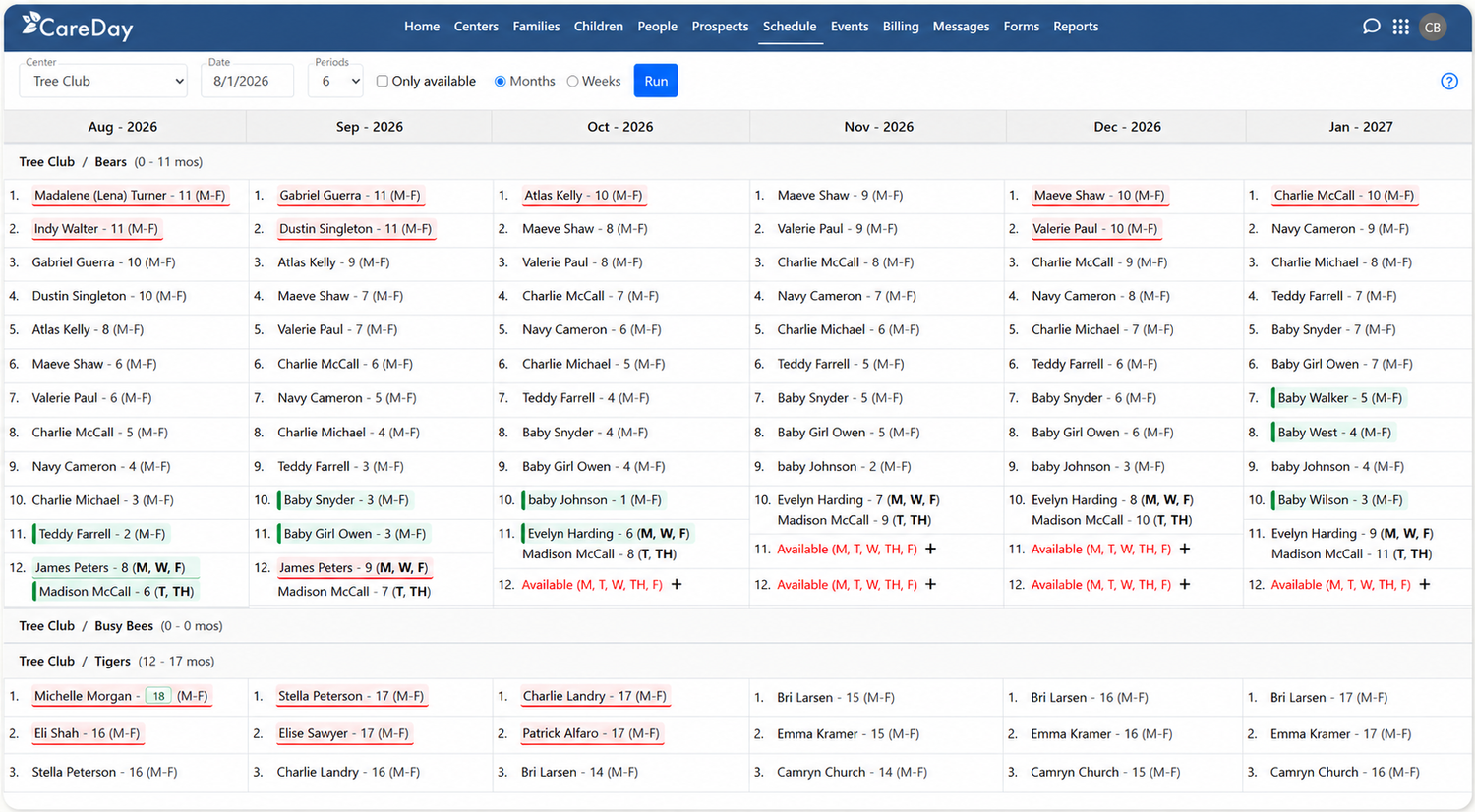
Schedule a child’s full journey through your program, with future room transitions recorded in the child’s schedule. See how that journey affects the places you can offer other families.
Make available days easier to use
See openings by classroom and attendance pattern, and let eligible enrolled families book available extra days.
Connect enrollment and billing
Evaluate how scheduled care, room changes, and additional bookings flow into charges and projected revenue.
Growing organizations with repeatable classroom and tuition structures are a useful starting point for this conversation. Bring your exceptions, too, so we can evaluate the fit for your operation.
CareDay and Brightwheel: compare the complete workflow
Both platforms support childcare operations. The useful comparison is how each handles your actual enrollment decisions—from a future start through classroom transitions and the resulting charges.
Enrollment and waitlists
CAREDAY
Schedule a child’s journey through all the rooms and programs you offer, reserve a suitable future place, and see the effect on availability.
BRIGHTWHEEL
Brightwheel describes digital enrollment, document collection, waitlist management, and enrollment visibility across locations.
Future classroom capacity
CAREDAY
Plan future starts, attendance periods, and room transitions years ahead within the programs you offer.
Use this four-step scenario to explore CareDay in your demo. Start with the child’s current attendance pattern. Schedule their future transitions through all the rooms and programs your organization offers—even when that journey spans years. Review the scheduled dates and what they mean for future capacity. Look at availability by classroom, date, and scheduled days. Discuss how your team would reserve a suitable future place for a family. Explore how an enrolled family can book available extra care days, with the booking reflected in the child’s schedule. See how scheduled care connects to charges and projected revenue. Bring a room move, a partial period, or a discount example to test your real operating needs. Explore enrollment management · See how extra-day booking works · Explore billing and payments Over a 12-month period, Balanced Family Academy used CareDay to sell additional care days to enrolled families. Its story shows how available capacity can become a practical part of an enrollment strategy. These figures represent one customer’s collected revenue from additional days, not profit or a guarantee of results. Explore how CareDay could connect enrollment, available care days, and billing for your program. Bring your current workflow so we can discuss the fit and the steps involved in switching. Bring one enrollment or billing scenario that creates extra work today. Include the Brightwheel workflows you use today, number of locations, and the people involved in the decision. Explore the path from the child’s schedule through classroom availability and billing. Include exceptions such as payer arrangements, discounts, or franchise requirements where they apply. Discuss data requirements, opening balances, family communication, staff training, and rollout responsibilities. Confirm what can transfer, what needs setup, and what timing is realistic for your organization. You do not need to upload family records to request a demo. A description of your current process is enough to start the conversation. Yes. CareDay combines enrollment, billing, family communication, and multi-center operations around the child’s living schedule. It is worth evaluating when future classroom transitions, unused days, and schedule-driven charges are important to your team. Brightwheel has announced enrollment forecasting; its 2026 announcement labels it “Coming soon” as of this comparison’s review. Confirm the current rollout with Brightwheel. Evaluate CareDay by scheduling the child’s full journey and following the effect on openings and billing. Yes. Compare how each handles your locations, staff access, enrollment decisions, and financial visibility. Bring an example that requires coordination between a director and your central operations team. Bring your number of locations, approximate enrollment, and one schedule or billing challenge. A future room move, part-time schedule change, or extra-day booking makes a useful example. No family records are needed to request the demo. Review data transfer, opening balances, billing exceptions, staff training, family communication, and rollout responsibilities before choosing a date. Request an estimate based on your billable enrollment and compare applicable setup, processing, and service costs across proposals.Follow one enrollment decision from schedule to billing
1. Plan the child’s next steps
2. Find the opening that actually fits
3. Put eligible extra days to work
4. Review the billing impact
Explore the connected workflow
What available days meant for Balanced Family Academy
Considering a move from Brightwheel? Start with a practical evaluation.
Show us what needs to work better
Test the full workflow
Scope the transition before committing
CareDay vs. Brightwheel: your questions answered
Is CareDay an alternative to Brightwheel?
Does Brightwheel offer enrollment forecasting?
Can both platforms support multiple locations?
What should we bring to a CareDay demo?
How do we evaluate switching effort and cost?